How to install the CB100 cam & retainer plate bolt kit
Inspect the components. Before installing any components, check for product damage and report any issues to us.
Lubricate under the bolt heads. Use the provided assembly lubricant under the head of each bolt. This reduces friction and allows for accurate torque readings.
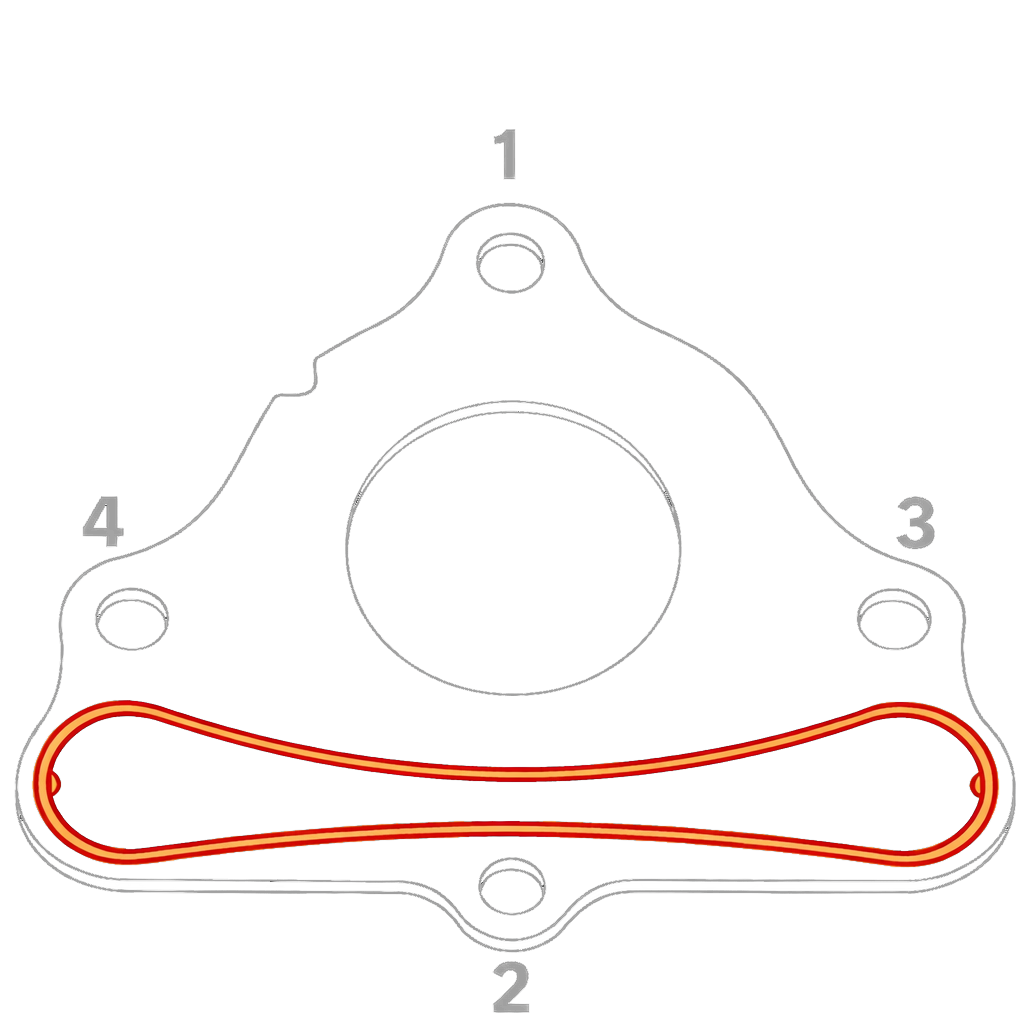
Hand-tighten, then torque in a cross pattern. Install the provided bolts onto the retainer plate and tighten them by hand. Torque the bolts to 25 ft-lbs using a cross pattern for even distribution of pressure.
CB100 retainer plate bolt torque specification
Fastener
Torque
Pattern
CB100 retainer plate bolts
25 ft-lbs
Cross pattern
Tightening sequence
CB100 retainer plate tightening sequence, as shown in the instruction manual.
With the retainer plate oriented as shown above, follow this order: 1. Top → 2. Bottom → 3. Right → 4. Left.



 Caterpillar
  Cummins
  Duramax (Chevy/GMC)
  Ford Power Stroke
 Acura
Acura Chrysler
 Honda
Honda Jaguar Land Rover
 Jeep
Jeep Mazda
Mazda Mini Cooper
 Mitsubishi
 Nissan
 Polaris
 Subaru
 Toyota
Leave a comment